$ cat /dev/brain > /dev/blog

Life is written in chapters but the table of contents is missing.

18 May

Google providing free WPA2 encrypted WiFi in Mountain View, CA


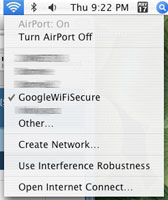
GoogleWiFiSecuredAs I’m lucky living in Mountain View, CA (hometown of Google where they provide free wireless internet access almost everywhere) I’ve been using GoogleWifi quite a lot when I was in town, e.g. at a coffee place (Take that, Starbucks-T-Mobile-6-Dollar-per-Hour-Wifi!).


I just recently found out, that Google is also providing WPA2 encrypted access to their wireless network. I was not able to see the network popping up in the Airport menu (see Google’s help page for an explanation why GoogleWiFiSecure is not visible) so set up a manual connection to GoogleWiFiSecure. Before you try that, log in to the GoogleWiFi (unencrypted) network and get your Google 802.1x username and password.

Google’s WiFi comes also in very handy when our Comcast line just dropped again. It’s doing that a lot at the moment. Well, Comcast suggests in their commercials that their cable internet service is way faster than DSL. They don’t talk about the stability of the connection though…


8 Responses to “Google providing free WPA2 encrypted WiFi in Mountain View, CA”

  1. David on May 19, 2007 | Reply

    Very interesting… Did you try to connect?

  2. Fred on May 19, 2007 | Reply

    Incidentally today during class I managed to connect to the 802.1X encrypted campus network in Karlsruhe for the first time. The problem turned out to be that more than one auth algorithm was checked in the OSX network settings (the right one was among them) but apparently it didn’t pick the right one on its own, so authentication failed.

    That it took me four weeks to figure that out is partly to blame on the fabulous user support who never bothered to care about my questions, or about OSX in general for that matter.

    Hope Google does a better job! :)

  3. David on May 19, 2007 | Reply

    Which settings were set and which was the right one? PEAP? I’m curious, did you check out the X509 (tls/ssl) certificate?

  4. Jean Pierre on May 19, 2007 | Reply

    You’ll find the detailed description for the connection settings here:
    http://wifi.google.com/support/bin/answer.py?answer=65601&topic=11363

    Additional information an GoogleWiFiSecure can be found here:
    http://wifi.google.com/support/bin/topic.py?topic=11363

    They also explain, why the GoogleWifiSecure SSID is not broadcasted (this means, you might not see it when scanning for networks although you have GoogleWiFiSecure reception).

    I used OS X’ “WPA2 Enterprise” WiFi setting to connect. You might want to choose EAP-PEAP or EAP-TTLS on other operating systems.

    And yes, I did check the X509 certificate (onex.wifi.google.com; issued by Equifax, expires 04/10/2009).

  5. Fred on May 19, 2007 | Reply

    In Karlsruhe, I had to pick TTLS explicitly. If you have problems, you should do that as well. I figure, it can’t hurt.

  6. Jean Pierre on May 19, 2007 | Reply

    To prove that it works, I’m just posting this comment sitting at Posh Bagle on Castro Street surfing the web. Very nice. ;)

  7. Jean Pierre on Sep 3, 2007 | Reply

    One year after starting their WiFi service in Mountain View, CA, Google is posting a summary on the Official Google Blog.

  1. 1 Trackback(s)

  2. $ cat /dev/brain > /dev/blog » iPhone city Mountain View, CA

Post a Comment