XMAS SHOPPING
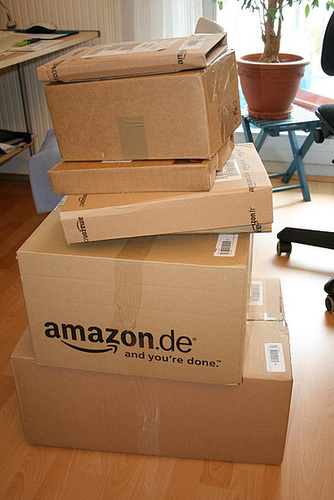
The mailman’s truck was half full/half empty after he delivered all of my Christmas gift packages… I wonder if packaging at Amazon could be a little more optimized 😉
The Nespresso espresso machine is V.’s christmas present for me and my present for her 😉 The crema of Nespresso’s caffè espresso is just awesome!
GÜNTER WALLRAFF IM CALL-CENTER
Günter Wallraff machte sich in der Vergangenheit mit investigativen Reportagen einen Namen. Seine letztes Projekt führte ihn zu Call-Centern, bei denen er im Mai 2007 in einem Zeit-Artikel die Geschäftspraktiken aufdeckt.
Den Beitrag “Bei Anruf Abzocke” gibt es mittlerweile als Video in der ZDF Mediathek.
MULTIPLE E-MAIL ADRESSES IN MAIL.APP
Today I stumbled upon a blog post in Hawk Wing’s blog which was written in 2005 but is still up-to-date: even with the latest version of Mail.app included in Mac OS X Leopard, you are able to use multiple e-mail addresses for one POP or IMAP account.
Within the mail account settings you will have to provide a comma-separated list of your e-mail addresses (e.g. me@example.com, mickey@example.com, donald@example.com) and then you can choose the address you want to use as the sender’s address from a pop-down menu in the “New Message” window. Nice 😉
More tips for Mail.app can also be found on Apple’s support pages.
LOGITECH'S CONTROL CENTER (MAC) 2.4.0 BREAKS GROWL NOTIFICATIONS
When upgrading my Mac from Tiger to Leopard, I had to remove the Logitech Control Center software. It relied on the Application Enhancer (APE) and caused the famous blue-screen-after-installation. Leopards’ systems settings provide some basic functionality for correctly binding keys from a Windows keyboard, but I really missed some of LCC’s features (e.g. binding the middle mouse button in a UNIX-style way to the “paste” keyboard shortcut).
Logitech has since updated LCC to version 2.4.0 but unfortunately they didn’t get it completely right this time (again). The software seems to work fine on Leopard (you can bind your keys to whatever action you want and see the battery status of your wireless keyboard and mouse), but it breaks Growl’s display notification.
So far, removing the folder /Library/InputManagers/LCC Scroll Enhancer Loader (and a reboot) results in Growl working properly again and the key bindings still work, too. If anyone experiences problems with this solution, please post them in the comments.
(Thanks to the folks at the Growl forum for their help with this issue)
MOUNTAIN DEW IN GERMANY
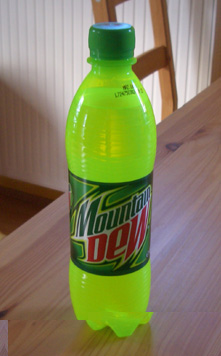 , a caffeinated soft drink from PepsiCo_. (Yeah, of course I also miss the low gas prices, the great Californian weather, 24-hours stores…)_
I couldn’t believe my eyes when I saw Mountain Dew bottles in a fridge at the local Shell gas station in Biberach this morning. It seems a little bit overpriced (1.49 EUR / 2.20 USD) for 0.5 l / 17 fl oz., but it tastes soooo good 😉 Grab it while it’s hot.